


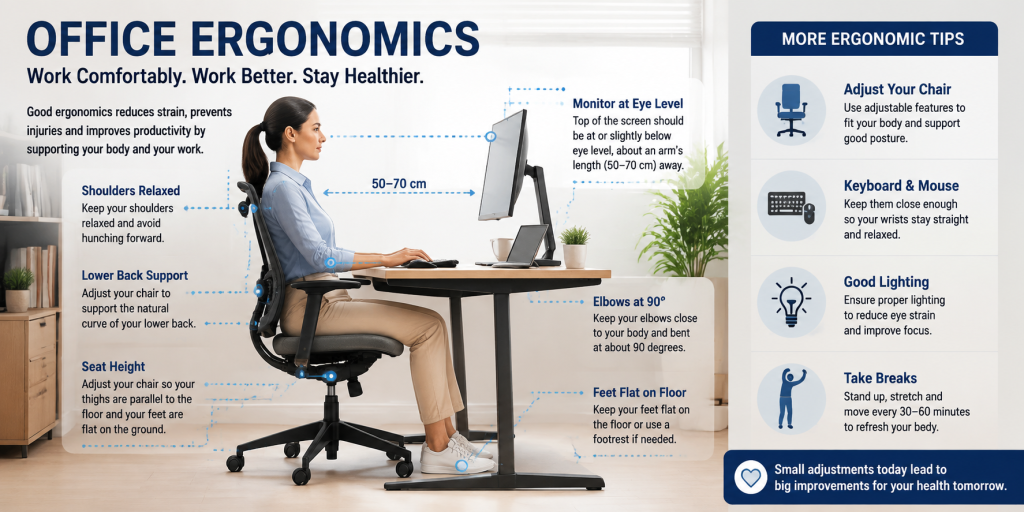
What is Office Ergonomics?
Definition
Office ergonomics is the science of arranging your workstation, equipment, and working habits to fit your body and the tasks you perform. This can include adjusting your chair and desk height, positioning your monitor at a comfortable viewing level, keeping your keyboard and mouse within easy reach, and changing posture regularly. The aim is to help you work in a comfortable, supported position while reducing unnecessary strain on your muscles, joints, eyes, and other parts of the body.
What are The Importance of Office Ergonomics?
Office ergonomics is important because it reduces workplace injuries, improves comfort, supports productivity, and prevents strain through proper workstation setup, posture correction, equipment adjustment, and regular movement.
The Importance of Office Ergonomics
Reduces Musculoskeletal Disorders
Poor workstation setup can increase stress on your muscles, joints, and spine. Office ergonomics reduces this risk by keeping your body in a neutral position while working.
Improves Comfort and Reduces Fatigue
An ergonomic workspace reduces the physical effort required to maintain a working position. This helps prevent discomfort caused by prolonged sitting and repetitive movements.
Supports Productivity
Physical discomfort can affect concentration and work efficiency. A properly arranged workstation allows you to focus on tasks without frequent adjustments caused by pain or fatigue.
Reduces Eye Strain
Office ergonomics also improves visual comfort during computer work. Incorrect screen position, lighting, and glare can contribute to headaches, dry eyes, and difficulty focusing.
Prevents Long-Term Workplace Problems
Ergonomics helps identify and correct risk factors such as awkward posture, repetitive movements, excessive reaching, and prolonged sitting before they become ongoing problems.
How to Improve Your Office Ergonomics?
You can improve your office ergonomics by following five key steps: adjusting your chair height and support, positioning your monitor correctly, setting up your keyboard and mouse properly, maintaining a neutral posture, creating a custom home office design and adding regular movement throughout your workday. These changes help reduce strain on your muscles and joints while creating a workstation that supports comfortable and efficient working habits.
Methods To Improve Office Ergonomics
Adjust Your Chair Height and Support
Your chair should support your lower back, hips, and legs without forcing your body into an uncomfortable position. A poorly adjusted chair can increase pressure on your spine and contribute to back and neck discomfort.
Follow these adjustments:
- Set the chair height so your feet rest flat on the floor.
- Keep your knees positioned at around a 90-degree angle.
- Adjust the backrest so it supports the natural curve of your lower back.
- Keep your shoulders relaxed and avoid relying heavily on armrests that push your shoulders upward.
A good sitting position keeps your hips slightly higher than your knees and allows your body to remain stable without unnecessary muscle effort.
Position Your Monitor at the Correct Height and Distance
Monitor placement affects your neck position and eye comfort. If your screen is too low, you may repeatedly bend your neck forward, which can increase strain during long working hours.
Use these guidelines:
- Place the monitor directly in front of you to avoid frequent twisting.
- Keep the screen about an arm’s length away, usually around 50 to 70 cm depending on screen size and viewing comfort.
- Position the top of the monitor at or slightly below eye level.
- Reduce glare by placing the screen away from direct light sources.
If you use two monitors, place the screen you use most directly in front of you and position the second monitor beside it to limit repeated neck rotation.
Set Up Your Keyboard and Mouse Correctly
Incorrect keyboard and mouse placement can increase pressure on your wrists, forearms, and shoulders. Your setup should allow your arms to stay relaxed while typing and using the mouse.
Make these adjustments:
- Keep the keyboard close enough so your elbows remain near your sides.
- Position the keyboard at a height where your elbows are bent close to 90 degrees.
- Keep your wrists straight instead of bending them upward or sideways.
- Place the mouse beside the keyboard at the same height to avoid reaching.
Avoid resting your wrists on sharp desk edges because constant pressure can cause discomfort during extended computer use.
Maintain a Neutral Working Posture
Good ergonomics depends on how your body is positioned while working, not only on your equipment. A neutral posture reduces unnecessary stress on your muscles and joints.
Maintain these positions:
- Keep your head aligned above your shoulders instead of leaning forward.
- Relax your shoulders and avoid lifting them while typing.
- Keep your back supported by the chair.
- Keep both feet supported on the floor or a footrest.
Your posture should also change throughout the day because holding one position for too long can create muscle fatigue.
Add Regular Movement Breaks
Even a well-designed workstation cannot remove the effects of sitting continuously. Regular movement helps reduce stiffness and allows your muscles to recover.
Use these methods:
- Stand, walk, or change position every 30 to 60 minutes.
- Stretch your neck, shoulders, wrists, and back during short breaks.
- Alternate between sitting and standing if you use an adjustable desk.
- Change tasks occasionally to avoid repeating the same movement for long periods.
Movement breaks are especially useful for reducing the effects of prolonged sitting and repetitive computer work.
Improve Lighting and Screen Habits
Lighting is part of office ergonomics because poor visibility can cause eye strain and encourage poor posture as you lean closer to the screen.
Improve your workspace by:
- Keeping your monitor away from direct glare.
- Adjusting screen brightness to match the room lighting.
- Increasing text size instead of moving closer to the screen.
- Following the 20-20-20 rule: every 20 minutes, look at something 20 feet away for at least 20 seconds.
A properly adjusted workstation combines suitable equipment, correct positioning, and regular movement. By making these changes, you can reduce physical stress and create a more comfortable working environment.
Create a Custom Desk and Workstation Setup
A custom desk and workstation can improve office ergonomics by matching your body dimensions, work requirements, and daily tasks instead of forcing you to adapt to a standard setup. A poorly sized desk can cause awkward arm positions, excessive reaching, or incorrect monitor placement.
When creating an ergonomic custom workstation, consider these adjustments:
Set the desk height correctly: A standard desk height is usually around 28 to 30 inches (71 to 76 cm), but the ideal height depends on your body size. Your desk should allow your elbows to remain close to a 90-degree angle while typing.
Provide enough leg clearance: Keep sufficient space under the desk so your knees, feet, and legs can move freely without hitting drawers, supports, or equipment.
Design the workspace around your tasks: If you use multiple monitors, drawing tablets, documents, or specialized equipment, position them within your normal reach zone to avoid repeated stretching or twisting.
Include adjustable features where possible: Height-adjustable desks allow you to alternate between sitting and standing, which can reduce the effects of prolonged sitting.
Place accessories strategically: Keep frequently used items such as the keyboard, mouse, phone, and documents close to reduce unnecessary movements.
Why is Custom Home Office Design Essential for Office Ergonomics?
A custom home office design is essential for office ergonomics because it allows your workspace, furniture, and equipment to be adjusted around your body, work habits, and daily tasks. Unlike standard office furniture, a customized setup helps you achieve better posture, reduce physical strain, improve comfort, and create a more efficient working environment through proper desk height, monitor placement, storage solutions, and movement space.
Our Horizon Bespoke Joinery team can assess your needs and create a custom home office design that optimises office ergonomics while reflecting your preferred style, functionality, and workspace requirements.